Reset Subaru Display
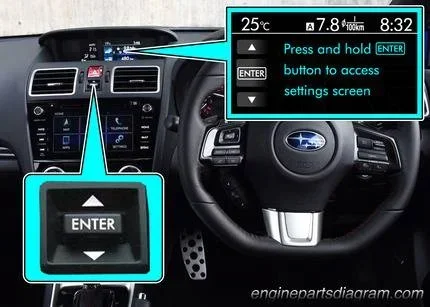
Resetting your Subaru display is simple once you know the right steps. This guide walks you through soft resets, hard resets, and common fixes for a frozen or glitchy screen. Whether your Subaru infotainment system is acting up or you need to clear a error message, you will find the solution here.
Have you ever been driving your Subaru and suddenly the display screen goes blank or freezes mid-trip? It is a frustrating experience, but the good news is that a simple reset often fixes the problem. Reset Subaru display issues are more common than you might think, and most drivers can handle the fix at home without a trip to the dealer.
Your Subaru’s display screen controls more than just the clock. It handles navigation, audio, vehicle settings, and sometimes even rear camera views. When that screen malfunctions, it can throw off your entire driving experience. Resetting the Subaru display is the first and often the best step toward getting everything back to normal.
In this guide, we will walk you through every method you can use to reset your Subaru screen. From a quick soft reset to a full hard reset, we have you covered. You will also learn why your display might be acting up in the first place and how to prevent it from happening again. Let us dive right in.
Key Takeaways
- Soft reset: A quick restart that fixes minor glitches without losing your settings.
- Hard reset: A full power cycle that clears deeper system issues on your Subaru display.
- Battery disconnect method: A reliable way to reset the Subaru screen when other steps fail.
- Common causes: Software bugs, loose connections, and outdated firmware can trigger display problems.
- Prevention tips: Regular updates and proper shutdowns help keep your Subaru display running smoothly.
📑 Table of Contents
Why Does Your Subaru Display Need a Reset?
Before we get into the how-to, it helps to understand why your Subaru display might need a reset in the first place. Screens in modern cars are essentially small computers. They run software, process inputs, and manage connections to other systems. Just like any computer, they can sometimes freeze or glitch.
Here are the most common reasons your Subaru display screen might stop working properly:
- Software bugs: Even the best infotainment systems can have bugs that cause the screen to freeze or show strange errors.
- Loose connections: Vibrations from driving can sometimes loosen internal cables connected to the display unit.
- Outdated firmware: If your system software has not been updated, it may not work as smoothly as it should.
- Power surges: Jump-starting your car or a weak battery can send irregular power to the display system.
- Overheating: On hot days, the display unit can overheat and shut down temporarily.
- Memory overload: Too much cached data or stored media can slow the system down and cause freezes.
Understanding the cause helps you choose the right reset method. A soft reset works well for minor glitches, while a hard reset is better for deeper issues. Let us look at each method in detail.
How to Perform a Soft Reset on Your Subaru Display
A soft reset is the quickest and easiest way to restart your Subaru infotainment screen. It is like restarting your phone. You do not lose any settings, saved navigation points, or paired devices. This method should always be your first step when the screen starts acting up.
Method 1: The Restart Button
Most newer Subaru models have a dedicated restart or power button on the display unit itself. Here is how to do it:
- Press and hold the power button on the display screen.
- Wait for the screen to turn completely off.
- Wait about 10 seconds.
- Press the power button again to turn the screen back on.
Your Subaru display should boot up normally within 15 to 30 seconds. If the screen still shows a frozen image, try the next method.
Method 2: Hold the Power Button for 10 Seconds
If the first method does not work, try holding the power button longer. This forces a complete shutdown of the display system:
- Press and hold the power button for a full 10 seconds.
- Release the button and wait 15 seconds.
- Press the button again to restart the screen.
This method is especially helpful when the screen is completely unresponsive to touch inputs. It gives the system a full power cycle that clears temporary errors from memory.
How to Perform a Hard Reset on Your Subaru Display
A hard reset goes deeper than a soft reset. It clears the system cache and resets the display to its default state. Think of it as a fresh start for your Subaru touchscreen. You may need to re-pair your phone or re-enter some preferences after a hard reset, but the screen should work like new.
Method 1: Disconnect the Battery
This is the most reliable hard reset method for a frozen Subaru display. Here is what you need to do:
- Park your car and turn off the engine.
- Open the hood and locate the battery.
- Use a wrench to loosen the negative (black) terminal cable.
- Remove the cable from the battery post and wait 5 minutes.
- Reconnect the cable and tighten it securely.
- Start your car and check if the display is working normally.
This method resets all electronic systems in your car, not just the display. It is a great fix for display issues caused by power irregularities or software conflicts.
Method 2: Fuse Box Reset
Some Subaru models allow you to reset the display by removing a specific fuse. Check your owner’s manual to find the right fuse for the infotainment system. Remove it for 30 seconds, then reinsert it. This method works well for display issues that persist even after a battery disconnect.
Common Subaru Display Problems and Quick Fixes
Not all display problems require a full reset. Some issues have simple fixes that take just a few seconds. Here are the most common problems drivers face with their Subaru display screen and how to solve them.
Screen Is Black but the Car Starts Fine
A black screen usually means the display is in sleep mode or has lost power. Try these steps:
- Turn the car off and wait 2 minutes.
- Turn the car back on and see if the screen wakes up.
- If it does not, try the soft reset method by holding the power button for 10 seconds.
If the screen stays black after a reset, there may be a loose connection behind the display unit. This is a common issue after battery replacements or jump-starts.
Screen Freezes on the Startup Logo
When your Subaru infotainment system gets stuck on the startup screen, it usually means the software has crashed during boot-up. A hard reset using the battery disconnect method almost always fixes this. If the problem keeps happening, your firmware may need updating.
Touchscreen Not Responding
A non-responsive touchscreen can be caused by a few things:
- Moisture: Rain or condensation under the screen can interfere with touch inputs.
- Screen protector: A poorly applied screen protector can block touch signals.
- Software glitch: A soft reset usually clears this type of issue.
Try drying the screen with a microfiber cloth first. If that does not work, a soft reset should do the trick. For persistent touch issues, a factory reset may be necessary.
Preventing Future Display Issues
Once you have successfully reset your Subaru display, you probably want to avoid dealing with this problem again. The good news is that a few simple habits can keep your screen running smoothly for years.
- Keep your firmware updated: Subaru releases software updates that fix bugs and improve performance. Check for updates during routine service visits.
- Avoid force restarting too often: While resets are safe, doing them frequently can wear out the system over time.
- Keep your battery healthy: A weak battery sends irregular power to your display. Replace your battery every 3 to 5 years.
- Clear cached data regularly: Delete unused apps and media files from your display system to free up memory.
- Use proper shutdown procedures: Always turn off the display through the menu before turning off the car. This prevents software corruption.
Think of your Subaru display like the screen on your phone or tablet. With regular care and occasional restarts, it will stay responsive and reliable. Just like you might need to reset the button on a NordicTrack treadmill when the console freezes, your car display sometimes needs the same kind of attention to get back on track.
Similarly, if you have ever dealt with a frozen screen on exercise equipment or other devices, you know that a simple reset often solves the problem. The process is very similar across different electronics, whether it is a reset button on a ProForm treadmill or your Subaru’s infotainment system. The key is knowing which type of reset to use and when.
Another helpful comparison: just as you might need to reset my Horizon T101 treadmill display when it shows an error code, your Subaru display may need a reset when it shows warning messages or freezes. The underlying principle is the same across all these devices. A reset clears the temporary errors and gives the system a fresh start.
When to See a Professional
Most Subaru display reset issues can be fixed at home with the methods we have covered. However, there are times when professional help is the right call. If you have tried both soft and hard resets and the screen still does not work, there may be a hardware problem.
Here are signs that you should take your Subaru to a dealer or qualified mechanic:
- The screen stays completely black even after a full battery disconnect reset.
- You see physical damage like cracks or water damage on the display unit.
- The display works intermittently and resets keep failing.
- Other electronic systems in your car are also malfunctioning.
- You smell burning or notice unusual sounds coming from the display unit.
Dealers have diagnostic tools that can pinpoint the exact cause of display problems. They can also check if a firmware update is available for your specific model and year. In some cases, the display unit itself may need to be replaced, which is a job best left to the professionals.
Remember that attempting to open or repair the display unit yourself can void your warranty. Always check with your dealer first if your car is still under warranty. It is better to be safe than to accidentally cause more damage.
Final Thoughts on Resetting Your Subaru Display
Resetting your Subaru display does not have to be scary or complicated. With the right steps, you can fix most screen issues in just a few minutes. Start with a soft reset for minor glitches and move to a hard reset if the problem persists. Keep your system updated and your battery healthy to prevent future issues.
Reset Subaru display problems happen to almost every driver at some point. The key is staying calm and following the right steps. Whether it is a quick restart or a full battery disconnect, you now have all the tools you need to get your screen working again. Safe travels and happy driving!
Frequently Asked Questions
How long does it take to reset a Subaru display?
A soft reset takes about 30 seconds. A hard reset using the battery disconnect method takes around 5 to 10 minutes including wait time. The total process is quick and does not require any special tools.
Will I lose my saved settings after resetting the Subaru display?
A soft reset keeps all your settings intact. A hard reset may reset some preferences like radio presets or Bluetooth pairings. Navigation saved points usually remain unless you perform a full factory reset.
Why does my Subaru screen keep freezing?
Frequent freezing is often caused by outdated firmware, low system memory, or a weak car battery. Try updating your software and clearing cached data. If the problem continues, a hard reset or professional diagnosis may be needed.
Can I reset the Subaru display while driving?
No, you should always pull over safely before attempting any reset. A frozen screen while driving can be distracting. If the screen freezes while driving, focus on the road and pull over to perform a reset when it is safe.
Do I need any special tools to reset my Subaru display?
No special tools are needed for a soft reset. For a hard reset using the battery disconnect method, you will need a basic wrench to loosen the battery terminal. That is all most drivers need.
Is it safe to disconnect the car battery to reset the display?
Yes, it is safe and is a common troubleshooting step. Just make sure the car is turned off and parked in a safe location. Always reconnect the negative terminal first and the positive terminal second when you are done.