How to Use Matrix Treadmill at Planet Fitness
Learning how to use Matrix treadmill at Planet Fitness is simple once you know the console, settings, and safety features. This guide walks you through powering on the machine, adjusting speed and incline, and creating a workout that fits your fitness level. Whether you are a beginner or returning to the gym, these tips will help you get the most out of every session.
Walking into a Planet Fitness gym and seeing the row of Matrix treadmills can feel a little intimidating. But here is the good news. Using the Matrix treadmill at Planet Fitness is easier than you think. These machines are designed for people at every fitness level, from complete beginners to seasoned gym-goers. In this guide, we will walk you through everything you need to know. You will learn how to power on the machine, adjust the settings, pick the right workout, and stay safe while you exercise.
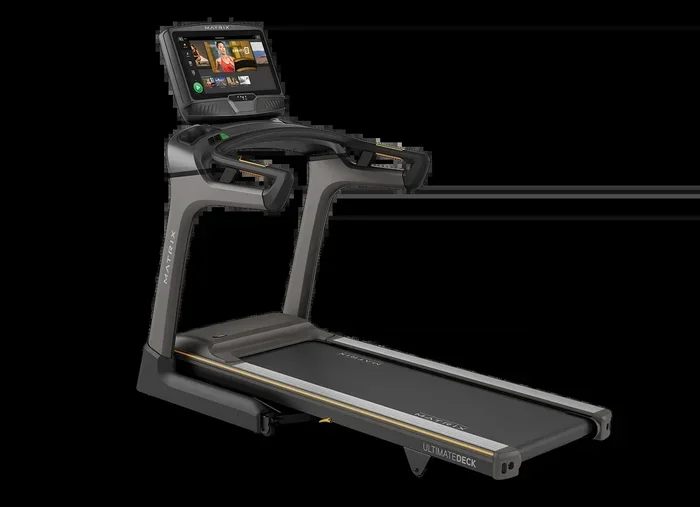
The Matrix treadmill is one of the most popular pieces of cardio equipment at Planet Fitness. It features a bright console screen, easy-to-read buttons, and preset workout programs. Whether your goal is to burn calories, improve heart health, or simply stay active, the Matrix treadmill has you covered. Let us dive into the details and get you comfortable on the machine.
Key Takeaways
- Easy Setup: The Matrix treadmill at Planet Fitness is beginner-friendly with a simple console and clear display.
- Safety First: Always clip the safety key and check the belt before starting your workout.
- Custom Workouts: You can adjust speed, incline, and use built-in programs to match your fitness goals.
- Heart Rate Tracking: The hand sensors and wireless monitors help you stay in the right zone.
- Best Timing: Off-peak hours give you more machine availability and less wait time.
- Maintenance Matters: Keeping the belt clean and lubricated extends the life of the machine.
- Apple Watch Integration: You can connect your Apple Watch to track metrics directly.
📑 Table of Contents
Getting Started With The Matrix Treadmill At Planet Fitness
Before you hop on and start running, it helps to understand the basics. The Matrix treadmill console is straightforward and user-friendly. Here is exactly what to do when you first step up to the machine.
Step 1: Check The Belt And Machine
Always give the treadmill a quick visual check before you start. Stand next to the belt and make sure it is not moving. Look at the treadmill deck for any debris or water. A clean belt runs smoother and lasts longer. If you notice any damage or unusual wear, pick a different machine.
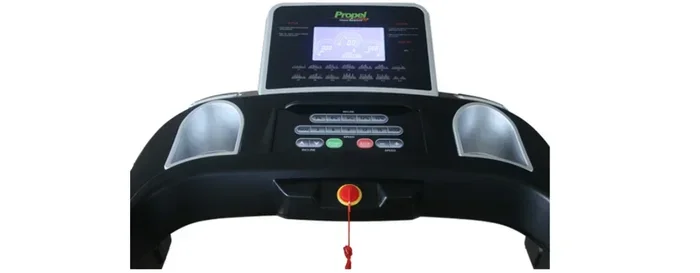
Next, make sure the emergency stop key is attached to the console. This small magnetic key plugs into the front of the treadmill. It is a treadmill safety feature that stops the belt instantly if you fall or lose balance. Never skip this step.
Step 2: Power On And Select Your Profile
Press the green button on the console to turn the machine on. The screen will light up and show the home menu. If you are a member with a Planet Fitness app profile, you may be able to select your saved workout preferences. Otherwise, just choose “Quick Start” to begin immediately.
The console will display your current speed, time, distance, and calorie burn. These numbers update in real time as you exercise. Watching them can be a great motivator during your session.
Step 3: Clip On The Safety Key
Clip the magnetic safety key to the front of your shirt or waistband. This is non-negotiable. If the key detaches during use, the treadmill will stop automatically. This treadmill emergency stop feature protects you from injury. It is one of the most important gym treadmill tips you will ever follow.
Understanding The Console And Controls
The Matrix treadmill console might look busy at first, but it is actually quite simple. Let us break down the main controls you will use every time you work out.
Speed And Incline Controls
The speed buttons are located on the front of the console. You can increase or decrease the belt speed in small increments. Start slow, especially if you are new to treadmill running. A comfortable walking pace is usually between 2.5 and 3.5 miles per hour.
The incline settings let you simulate hills and increase the intensity of your workout. You can adjust the incline manually or select a preset program that changes the incline automatically. Adding even a small incline can significantly boost your calorie burn and engage more muscles in your legs and glutes.
Display Screen And Metrics
The bright display screen shows all the key metrics at a glance. You will see:
- Speed: How fast the belt is moving
- Time: How long you have been exercising
- Distance: Total miles or kilometers covered
- Calories Burned: Estimated energy expenditure
- Heart Rate: From the hand sensors or wireless monitor
These numbers help you track your progress and stay in your target heart rate zone. If you want more detailed tracking, consider connecting your Apple Watch to the treadmill for real-time metrics on your wrist.
Preset Workout Programs
The Matrix treadmill comes with several built-in workout programs. These are pre-set routines that automatically adjust speed and incline throughout your session. Some popular options include:
- Fat Burn: A steady, moderate-intensity workout
- Cardio: Higher intensity with interval changes
- Hill Climb: Increasing incline to simulate uphill running
- Interval Training: Alternating between fast and slow speeds
These programs are perfect if you do not want to manually adjust settings. Just pick one, and let the machine guide your workout.
Creating Your Perfect Treadmill Workout
Now that you know how the console works, it is time to build a workout that actually works for you. A good treadmill workout plan depends on your fitness level and goals.
Beginner Treadmill Workout
If you are just starting out, keep it simple. Begin with a 5-minute warm-up walk at 3.0 mph. Then increase to a brisk walk or light jog for 15 minutes. Finish with a 5-minute cool-down walk. This walking treadmill workout is gentle on your joints and builds endurance over time.
Intermediate Workout
Once you feel comfortable, try adding intervals. Walk fast for 2 minutes, then jog for 1 minute. Repeat this cycle for 20 minutes. The treadmill interval training approach boosts your cardiovascular fitness and burns more calories than steady-state walking.
Advanced Workout
For experienced runners, use the hill climb program or manually increase the incline to 4-6 percent. Maintain a running pace of 6-8 mph for 30 minutes. This type of workout builds serious leg strength and cardiovascular endurance.
Safety Tips And Best Practices
Safety should always come first when using any fitness equipment. The Matrix treadmill is no exception. Here are the most important safety practices to follow every single time.
Always Use The Safety Key
This cannot be stressed enough. The treadmill safety key is your best protection against accidents. Clip it on before you start. If you trip, the machine stops within seconds. Never remove the key while the belt is moving.
Start Slow And Build Up
Many injuries happen when people jump on the treadmill at full speed. Always begin with a warm-up walk. Gradually increase your pace over several minutes. This approach protects your joints, muscles, and cardiovascular system.
Stay Hydrated
Keep a water bottle nearby. Cardio workouts cause you to sweat and lose fluids. Dehydration can lead to dizziness, cramps, and fatigue. Take small sips between intervals to stay properly hydrated.
Know The Emergency Stop
Locate the emergency stop button on the console before you start. In case of any issue, you need to know exactly where it is. This is one of the most overlooked gym treadmill tips but it can make a huge difference in an emergency.
Common Mistakes To Avoid
Even experienced gym-goers make mistakes on the treadmill. Here are the most common errors and how to fix them.
Skipping The Warm-Up
Jumping straight into a fast run without warming up strains your muscles and increases injury risk. Always start with 3-5 minutes of walking. Think of it as warming up the treadmill and your body at the same time.
Holding The Handrails
Gripping the handrails too tightly changes your natural posture and reduces the effectiveness of your workout. It also limits your calorie burn. Use the handrails only for balance when needed, not as a crutch throughout the entire workout.
Ignoring The Cool-Down
Stopping abruptly after a intense session can cause dizziness and muscle stiffness. Always end with a 5-minute cool-down walk. This helps your heart rate return to normal gradually and reduces post-workout soreness.
Not Cleaning The Machine
Planet Fitness provides towels for a reason. Wipe down the treadmill after you use it. This is basic gym etiquette and also helps with treadmill belt maintenance. A clean machine performs better and lasts longer for the next person.
Tips For Maximizing Your Results
Want to get the most out of every treadmill session at Planet Fitness? These proven strategies will help you see real results faster.
Use The Incline Feature
Walking or running on an incline engages more muscle groups and increases your heart rate without adding extra stress on your joints. Even a 1-2 percent incline can make a noticeable difference in your treadmill calorie burn.
Mix Up Your Workouts
Doing the exact same routine every day causes your body to adapt. Rotate between steady-state walks, interval training, and hill climbs. This keeps your workouts challenging and prevents plateaus. Variety is the key to long-term fitness progress.
Track Your Progress
Use the data on the console to track your improvements over weeks and months. Notice when your pace gets faster or your distance increases. These small wins keep you motivated. You can also use a fitness app or sync your watch for detailed tracking.
Consider The Time Of Day
If you want a more comfortable experience, consider visiting during off-peak hours. Early mornings and late evenings tend to be less crowded. You will have more machine options and a more relaxed workout environment.
Combine With Strength Training
The treadmill is great for cardio exercise, but pairing it with strength training gives even better results. After your treadmill session, try a few sets of dumbbells or bodyweight exercises. This combination boosts your metabolism and builds lean muscle.
Maintenance And Care Tips
Taking care of the treadmill extends its life and keeps it running smoothly. Here are a few simple maintenance tips.
- Wipe the belt after every use with a clean towel
- Check the belt alignment regularly for any slipping or uneven wear
- Lubricate the deck if you notice squeaking or friction
- Keep the console screen clean and free of dust
- Report any issues to the front desk immediately
These small habits make a big difference. A well-maintained Planet Fitness treadmill provides a smoother, safer, and more enjoyable workout experience for everyone.
Final Thoughts
Using the Matrix treadmill at Planet Fitness is one of the simplest and most effective ways to stay active. From powering on the machine to picking the right program, this guide has covered everything you need to get started. Remember to always clip on the safety key, warm up properly, and listen to your body. Whether you are walking for weight loss, training for a 5K race, or just staying consistent with your cardio routine, the Matrix treadmill has the tools to support your goals.
Start with what feels comfortable, gradually challenge yourself, and track your progress. The results will come with consistency. Now go hop on that treadmill and crush your workout.
Frequently Asked Questions
How do I turn on the Matrix treadmill at Planet Fitness?
Press the green power button on the console. The screen will light up and display the home menu. Make sure the safety key is plugged in and clipped to your clothing before you start walking or running.
What is the best treadmill workout for beginners at Planet Fitness?
A simple walking workout is perfect for beginners. Start with a 5-minute warm-up walk at 3.0 mph, then walk briskly for 15-20 minutes, and finish with a 5-minute cool-down. This low-impact routine builds endurance without overwhelming your body.
Can I connect my phone or watch to the Matrix treadmill?
Yes. You can connect your Apple Watch or other Bluetooth-enabled devices to track heart rate and metrics. Some consoles also support USB charging for your phone while you exercise.
How do I adjust the speed and incline on the Matrix treadmill?
Use the arrow buttons on the console to increase or decrease speed. The incline can be adjusted manually or through preset workout programs that automatically change the gradient throughout your session.
Is it safe to run on the Matrix treadmill at Planet Fitness?
Yes, it is safe when you follow basic precautions. Always clip on the safety key, start with a warm-up, and stay hydrated. If you are new to running, begin with brisk walking and gradually increase your pace over several weeks.
How do I clean the treadmill after my workout?
Use the towels provided by Planet Fitness to wipe down the belt and console screen. This keeps the machine hygienic for the next user and helps with proper treadmill belt maintenance. Always report any unusual noises or issues to the front desk.