How to Read the Distance on a Treadmill
Learning how to read the distance on a treadmill is easier than you think. Most treadmill consoles show your miles, kilometers, steps, and calories in real time. This guide breaks down every display metric so you can track your progress confidently and reach your fitness goals faster.
Have you ever hopped on a treadmill and stared at the console, completely confused by all the numbers flashing on the screen? You are not alone. The how to read the distance on a treadmill question comes up all the time, especially for beginners. But here is the good news: it is much simpler than it looks.
Understanding your treadmill display is one of the most valuable skills you can build as a fitness enthusiast. Whether you are walking for health, training for a race, or trying to shed a few pounds, knowing how to interpret your distance readings helps you stay on track. In this guide, we will walk you through everything you need to know about reading treadmill distance like a pro.
The distance number on your treadmill tells you how far you have traveled during your workout. It is usually measured in miles or kilometers. Most modern machines also track steps, pace, and elevation. Once you understand what each number means, you can use the data to push yourself further and measure real progress.
Key Takeaways
- Know your display: Treadmill consoles show distance, speed, time, calories, and sometimes incline.
- Miles vs. kilometers: You can switch between units on most machines for comfortable tracking.
- Distance accuracy depends on belt length: Calibrated belts give reliable readings, but manual checks help.
- Use distance to set goals: Tracking miles helps you plan workouts and measure improvement over time.
- Pair distance with pace: Understanding both metrics gives you a complete picture of your workout intensity.
- Check your machine regularly: A well-maintained treadmill provides more accurate distance readings.
📑 Table of Contents
- Understanding the Treadmill Display Screen
- Miles vs. Kilometers: Which Should You Use?
- How Treadmill Distance Is Measured
- Using Distance Data to Improve Your Workouts
- Common Mistakes When Reading Treadmill Distance
- Quick Tips for Better Distance Tracking
- Expert Insights on Treadmill Distance Accuracy
- Final Thoughts
Understanding the Treadmill Display Screen
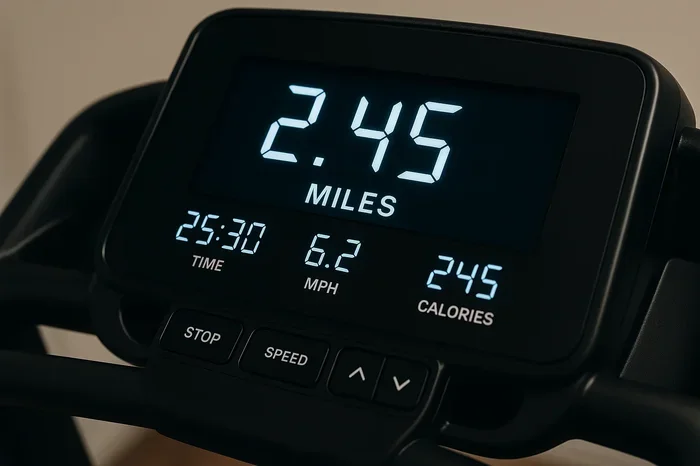
The console on your treadmill might look overwhelming at first glance. But once you know what each number represents, it all clicks into place. The display is your window into every workout. Let us break it down piece by piece.
Distance Reading
The distance reading is usually the most prominent number on the screen. It shows how far you have moved during the current session. On most machines, this is measured in miles. Some models let you switch to kilometers with the push of a button. If you are following a how to read the distance on a treadmill guide, this is the first number you should learn to trust.
Your distance resets when you start a new workout. So if you walked 1.5 miles in your first session and then hop back on later, the display starts fresh from zero. Some advanced treadmills store your history, but the live readout always starts at zero for each new run.
Speed and Pace
Speed tells you how fast you are moving, usually in miles per hour (mph) or kilometers per hour (km/h). Pace is the inverse: it shows how long it takes you to cover one mile or kilometer. For example, a speed of 6 mph equals a pace of 10 minutes per mile. Both numbers help you gauge your effort level and adjust accordingly.
If you want to learn more about typical speeds, check out our guide on what is the average speed on a treadmill. It gives you a great baseline for comparison.
Time and Calories
The time display counts up from zero as long as your belt is moving. It does not include rest periods if you pause the machine. Calories burned is an estimate based on your weight, speed, and workout duration. It is a useful ballpark number but not perfectly precise. Think of it as a rough guide, not a scientific measurement.
Miles vs. Kilometers: Which Should You Use?
One of the first decisions you will face is whether to track your distance in miles or kilometers. Most treadmills sold in the United States default to miles. However, many models include a simple setting to switch to kilometers. The process is usually straightforward and found in the settings or display menu.
If you are training for a race that uses kilometers, switching your treadmill to metric mode makes sense. On the other hand, if you are more comfortable with miles, stick with that unit. The key is consistency. Pick one system and stick with it so your progress is easy to compare over time.
Want to know exactly how a mile translates on the treadmill? We have a detailed breakdown of how many distance is a mile on a treadmill that you will find helpful.
How Treadmill Distance Is Measured
Ever wonder how the treadmill actually knows how far you have gone? The answer lies in the belt sensor. Every time the belt completes one full rotation, the sensor counts it. The machine then multiplies the belt length by the number of rotations to calculate total distance.
Here is a simple way to think about it. Imagine marking a spot on a bicycle tire. Every time the tire spins around, that spot travels a fixed distance. The treadmill works the same way. The belt length is fixed, so the machine just counts rotations and converts them into miles or kilometers.
Belt Length Matters
The accuracy of your distance reading depends on the belt length being correct. Most standard treadmill belts are around 60 to 65 inches long. If the belt stretches over time, the distance reading can become slightly off. This is why periodic calibration matters.
You can check your belt length by measuring it with a tape measure. If it has stretched significantly, your distance numbers may be slightly higher than your actual movement. A well-maintained belt keeps your readings accurate and reliable.
Calibration Tips
Calibrating your treadmill is easier than you might think. Here are a few simple steps you can follow:
- Mark a spot on the belt with a piece of chalk.
- Walk or run at a steady pace for exactly one minute.
- Count the number of times the mark passes a fixed point.
- Multiply the belt length by the rotation count.
- Compare the result with what the treadmill display shows.
If the numbers match closely, your machine is reading accurately. If not, you may need to consult your treadmill manual or contact customer support for recalibration instructions.
Using Distance Data to Improve Your Workouts
Reading distance is one thing. Using it wisely is another. The real power of your treadmill data comes from how you apply it. Let us look at practical ways to turn your distance readings into real fitness gains.
Setting Distance Goals
One of the best ways to stay motivated is to set clear distance goals. Maybe you want to walk 3 miles every day. Or perhaps you are working up to a 5K, which is about 3.1 miles. Having a target gives your workout purpose and direction.
Start small if you are new to treadmill training. Aim for 1 mile and build from there. Over time, you can increase your distance gradually. This approach reduces the risk of injury and keeps you consistent.
Curious about how many steps are in a mile on a treadmill? Check out our article on how many steps on a treadmill to lose weight for a helpful breakdown.
Tracking Progress Over Time
Your treadmill console or a fitness app can store your workout history. This lets you compare your distance week over week or month over month. Seeing your progress in black and white is incredibly motivating. You might notice that you are covering more ground in less time, which is a clear sign of improvement.
Here are a few ways to track progress effectively:
- Keep a workout journal with date, distance, and time.
- Use a fitness app that syncs with your treadmill.
- Set monthly distance challenges for yourself.
- Compare your pace at the same distance over several weeks.
Matching Distance to Your Fitness Goals
Different goals call for different distance strategies. If you are focused on weight loss, longer distances at a moderate pace work well. If you are training for speed, shorter distances at a higher pace make more sense. Understanding your goal helps you read your distance data in context.
For example, someone walking for general health might aim for 2 to 3 miles per session. A marathon trainee might target 10 to 15 miles per week on the treadmill. Both are valid. The key is aligning your distance goals with what you want to achieve.
Need help figuring out how far to go for weight loss? Our guide on how many miles on the treadmill to lose weight covers this in detail.
Common Mistakes When Reading Treadmill Distance
Even experienced treadmill users sometimes make mistakes when interpreting their distance data. Being aware of these pitfalls helps you get more accurate and useful information from every workout.
Ignoring the Warm-Up Period
Many treadmills start counting distance the moment you press start, even during the warm-up walk. This can inflate your total distance slightly. Some users reset the display after the warm-up to get a cleaner reading. This is a simple trick that keeps your data more accurate.
Confusing Steps with Miles
Some treadmills display step count alongside distance. These are two very different metrics. Steps count every footfall, while distance measures total ground covered. A brisk walk of 1 mile typically equals around 2,000 steps, but this varies based on stride length and pace. Do not mix the two numbers up when evaluating your workout.
Overestimating Calorie Burn Based on Distance
Distance alone does not tell the full story. Two people walking the same distance may burn very different calories depending on weight, speed, and incline. The calorie estimate on your treadmill is just that: an estimate. Use it as a general guide, not an exact science.
Not Accounting for Incline
Walking or running on an incline makes your body work harder. The treadmill distance reading does not change, but the effort does. A 1-mile walk at a 5% incline is a very different workout than a 1-mile walk on a flat surface. Keep this in mind when comparing workouts or setting benchmarks.
Quick Tips for Better Distance Tracking
Want to get the most out of your treadmill distance readings? Here are some quick, practical tips that make a big difference:
- Always wear your shoes. Barefoot walking changes your stride and can affect step-based metrics.
- Check your belt regularly. A worn or stretched belt leads to inaccurate readings.
- Use the same unit consistently. Switching between miles and kilometers makes comparison confusing.
- Note the incline setting. It affects effort even when distance stays the same.
- Reset your display before each workout. This ensures clean, session-specific data.
- Sync with a fitness app. Apps provide long-term trend analysis that the console alone cannot.
- Stay consistent with your workouts. Regular tracking over weeks and months reveals real patterns.
For more tips on getting accurate treadmill readings, also check out our piece on how to run on a treadmill and lose weight. It covers workout strategies that pair well with distance tracking.
Expert Insights on Treadmill Distance Accuracy
Fitness professionals agree that treadmill distance readings are generally reliable for everyday use. However, they also note that no machine is perfect. Small variations can occur based on belt wear, calibration, and user weight. The key is not to obsess over exact numbers but to focus on trends and consistency.
Certified trainers often recommend using the treadmill as a tool for comparison, not as an absolute measurement device. If your distance goes up over several weeks, that is real progress. If one session reads slightly different from the last, do not stress about it. The big picture matters more than any single number.
Additionally, many experts suggest cross-referencing your treadmill distance with how you feel. Are you breathing harder? Are your legs feeling more fatigued? These physical cues complement the numbers on the screen and give you a fuller picture of your workout quality.
Final Thoughts
Learning how to read the distance on a treadmill is a simple yet powerful step toward better fitness. Once you understand your console, you can set goals, track progress, and push yourself with confidence. The numbers on that screen are not just random data. They are a roadmap to a stronger, healthier you.
Start by familiarizing yourself with the basic metrics: distance, speed, time, and calories. Pick a unit that feels natural and stick with it. Set small, achievable goals and build from there. Over time, you will find that reading your treadmill distance becomes second nature. And the progress you see will keep you motivated to keep going.
Every mile counts. Every step matters. The more you understand your machine, the more you get out of every workout. So next time you hop on the treadmill, take a moment to look at that distance number. It is telling you a story about your effort and your progress. Learn to read it, and you will unlock a whole new level of fitness awareness.
Want to dive deeper into treadmill training? Explore our full collection of treadmill guides and start making the most of every workout today.
Frequently Asked Questions
What does the distance number on a treadmill mean?
The distance number shows how far you have traveled during your workout. It is usually measured in miles or kilometers, depending on your machine settings. This number resets to zero each time you start a new session.
Is treadmill distance accurate?
Treadmill distance readings are generally accurate for everyday use. They are based on belt length and rotation count. However, factors like belt stretching or wear can slightly affect accuracy over time. Regular calibration helps keep readings reliable.
Can I switch my treadmill from miles to kilometers?
Yes, most modern treadmills allow you to switch between miles and kilometers in the settings menu. The process is usually simple and involves pressing a button or navigating through the console options. Refer to your treadmill manual if you need help finding the setting.
How many miles should I walk on a treadmill to lose weight?
The answer depends on your weight, pace, and diet. A brisk walk of 2 to 3 miles per session is a great starting point for weight loss. Combining treadmill walking with a balanced diet gives the best results. For more specific guidance, check out our detailed article on how much walking on a treadmill to lose weight.
Does incline affect treadmill distance readings?
No, incline does not change the distance reading. The treadmill measures belt rotation, which stays the same regardless of incline. However, walking or running on an incline increases effort and calorie burn, even though the distance stays constant.
How often should I calibrate my treadmill?
Most experts recommend checking your treadmill calibration every few months. If you notice distance readings that seem off, it is a good idea to recalibrate sooner. A simple chalk-and-count method works well for most home treadmills.