How Do I Turn on My Proform Treadmill
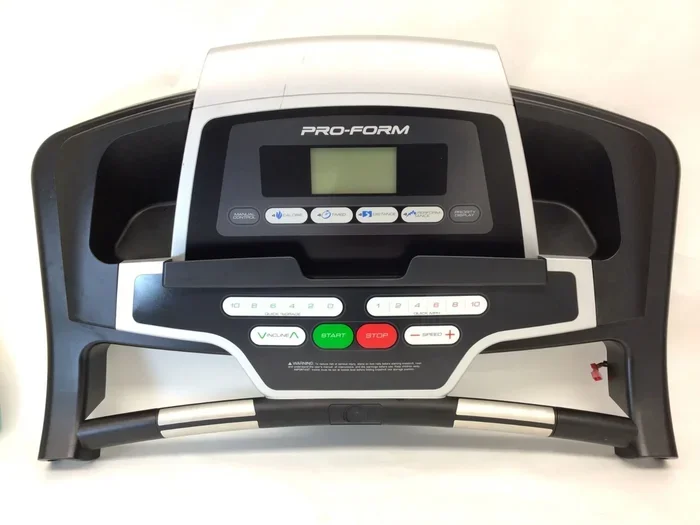
Turning on your Proform treadmill is easy once you know the right steps. This guide walks you through powering up your console, inserting the safety key, and navigating basic settings. We also cover common startup problems and quick fixes so you can get back to your workout fast.
So you just unboxed your shiny new Proform treadmill and you are ready to start running. But wait, how do you actually turn the thing on? It sounds simple, right? Yet many first-time users find themselves staring at the console, pressing buttons, and wondering why nothing happens. This guide will walk you through the exact process step by step, so you can get moving without any frustration.
Whether you own a basic Proform model or a high-tech Proform 9000, the startup process follows a similar pattern. We will cover everything from plugging in the power cord to navigating the treadmill console after it boots up. Along the way, we will also address common problems that prevent the machine from powering on. By the end of this article, you will feel confident firing up your treadmill every single time.
Let us be real. Buying a treadmill is exciting, but the setup and first use can feel overwhelming. You are not alone if you have stood in front of your machine and thought, “Why won’t this thing turn on?” The good news is that most startup issues are easy to fix. You just need to know what to look for. So let us dive right in and get your Proform treadmill running.
## How to Turn On Your Proform Treadmill
Getting your treadmill powered up takes just a few simple steps. Follow this sequence every time and it will become second nature.
### Step 1: Place the Treadmill on a Level Surface
Before you even think about pressing any buttons, make sure your treadmill sits on a flat, stable floor. An uneven surface can cause the machine to wobble during startup and even trigger safety shutoffs. Check that all four feet are touching the ground evenly. If your floor is slightly uneven, adjust the leveling feet at the bottom of the frame until the machine feels solid.
A wobbly treadmill can also cause premature wear on the motor and belt. Take the extra thirty seconds to level it properly. Your machine will last longer and perform better every time you use it.
### Step 2: Plug In the Power Cord
This sounds obvious, but it is the number one reason a treadmill will not turn on. Locate the power cord at the back of the machine and make sure it is firmly plugged into a working wall outlet. Do not use an extension cord or a power strip unless it is rated for high-wattage fitness equipment. These can limit the electrical current and prevent proper startup.
If your outlet has a switch, make sure it is flipped to the “on” position. Some homes also have ground fault circuit interrupter (GFCI) outlets in garages or basements. If the outlet keeps tripping, try plugging the treadmill into a different outlet in another room.
### Step 3: Insert the Safety Key
Every Proform treadmill comes with a magnetic safety key. This small device clips onto your clothing and plugs into the console. Its purpose is to stop the belt instantly if you fall or lose your balance. The treadmill will not start without this key inserted.
Slide the key into the designated slot on the console or the front of the machine. You should feel it click into place. If your key is missing or damaged, contact Proform customer support for a replacement. Do not try to run the treadmill without it.
### Step 4: Press the Power Button
Now the fun part. Look at the console and find the power button. On most Proform models, this is a large button labeled “Power” or marked with a circle and a line symbol. Press it firmly once. The console screen should light up and display the home screen or a welcome menu.
If nothing happens, do not panic. Try pressing and holding the button for three to five seconds. Some models require a longer press to wake the system. You can also try unplugging the machine for thirty seconds, then plugging it back in and pressing the power button again.
### Step 5: Navigate the Startup Screen
Once the console powers on, you will see a menu or dashboard. Use the arrow keys or touch screen to select your preferences. Most Proform treadmills let you choose a workout program, set a target speed, and adjust the incline. Take a moment to explore the display so you know where everything is located.
Some models also let you watch Netflix on your Proform 9000 treadmill or connect to fitness apps during your workout. These features require a Wi-Fi connection, so make sure your treadmill is connected to your home network before you start running.
## Understanding Your Treadmill Console
The console is the brain of your Proform treadmill. It controls everything from power to speed to tracking your workout stats. Understanding how it works makes the whole experience smoother.
### What Does the Console Display?
When your treadmill is on, the console typically shows your current speed, distance traveled, elapsed time, calories burned, and heart rate. Some advanced models also display your incline level and pace. All of this data updates in real time as you run or walk.
If the display looks dim or hard to read, check the brightness settings in the menu. You can usually adjust it to match the lighting in your room. This small tweak makes a big difference during early morning workouts or late evening sessions.
### Common Console Functions
Most Proform consoles share similar button layouts. Here are the functions you will use most often:
- Power: Turns the treadmill on and off.
- Start: Begins the belt movement at your selected speed.
- Stop: Stops the belt immediately.
- Speed Up/Down: Adjusts your pace in small increments.
- Incline Up/Down: Raises or lowers the running surface.
- Quick Start: Starts the treadmill at a default speed, usually 2 to 3 mph.
Take time to read the labels on your specific model. Button placement varies between Proform series, so knowing exactly where each control is will save you from fumbling mid-workout.
## Troubleshooting When Your Treadmill Won’t Turn On
Sometimes, even after following all the steps, your treadmill refuses to power on. This section covers the most common reasons and how to fix them.
### Check the Power Supply
Start with the basics. Is the power cord fully inserted into the wall outlet? Try unplugging it and plugging it back in firmly. Test the outlet by plugging in another device, like a lamp or phone charger, to confirm it is working.
Also check the power cord itself for any visible damage. Frayed wires or exposed insulation mean the cord needs replacing. Never use a damaged power cord. Contact Proform support or a qualified technician to get it repaired safely.
### Reset the Circuit Breaker
Many Proform treadmills have a built-in circuit breaker that trips if the motor overheats or draws too much power. Look for a small reset button on the front of the machine, usually near the power cord area. Press it to reset.
If the breaker trips again immediately after resetting, let the treadmill cool down for at least fifteen minutes. Overheating often happens during the first few uses before the motor breaks in. Make sure the treadmill is on a hard, flat surface and has at least two to three feet of clearance on all sides for proper ventilation.
### Replace the Safety Key
A worn or faulty safety key can prevent startup. Remove the key and inspect it for cracks or damage. Try reinserting it firmly. If the console still shows no response, the key may need replacement. Proform sells replacement keys on their website and through authorized retailers.
### When I Step on the Treadmill It Stops
If your treadmill powers on but stops the moment you step on the belt, this could indicate a different issue. The safety key might not be making proper contact, or the belt could be misaligned. Check that the key is clipped securely to your clothing and seated fully in the slot. Also inspect the belt for any debris or obstructions underneath.
For more detailed help with this specific problem, check out our guide on why your treadmill stops when you step on it. It covers the most common causes and fixes in detail.
## Maintaining Your Proform Treadmill After Powering On
Once you know how to turn on your machine, keeping it in great shape becomes the next priority. Regular maintenance extends the life of your treadmill and ensures a smooth, safe workout every time.
### Lubricate the Belt Regularly
The treadmill belt needs lubrication to glide smoothly under your feet. Without it, friction builds up and can damage the motor over time. Most Proform models require a 100% silicone-based belt lubricant. Apply it every three to six months, or more often if you use the treadmill daily.
If you are unsure whether your belt needs lubricant, we have a helpful guide that walks you through the signs to look for. Check out how to tell if your treadmill needs lubricant for easy tips and visual cues.
### Keep the Belt Aligned
A misaligned belt can cause the machine to pull to one side or make squeaking noises. Periodically check that the belt sits centered on the deck. If it has shifted, turn off the treadmill and use an Allen wrench to adjust the alignment bolts on the back of the machine.
### Clean the Console and Frame
Dust and sweat can build up on the console and around the belt area. Wipe down the screen with a soft, damp cloth after each use. Avoid harsh chemical cleaners that could damage the electronic components. A clean machine not only looks better but also performs better.
## Safety Tips for Using Your Proform Treadmill
Safety should always come first when using any fitness equipment. Here are essential tips to keep in mind every time you power on your treadmill.
### Always Use the Safety Key
The safety key is not optional. It is designed to stop the belt instantly if you trip or lose balance. Never run the treadmill without the key clipped to your clothing. Keep the key in a safe place when the machine is not in use to prevent loss or damage.
### Start at a Low Speed
When you first step onto the treadmill after powering it on, begin at a walking pace of 2 to 3 mph. Gradually increase your speed as you feel comfortable and steady. Jumping straight to a high speed is a leading cause of treadmill injuries.
### Stay Hydrated and Aware
Keep a water bottle nearby and take sips during your workout. Also, avoid looking at your phone or turning your back to the console for extended periods. Staying aware of your surroundings and your body helps prevent accidents.
Electric shock is another safety concern with treadmills. If you ever feel a tingling sensation or shock while using your machine, stop immediately and unplug it. Check the power cord for damage and make sure your treadmill is on a dedicated outlet. For more information on this issue, read our article on why you might get shocked on your treadmill.
## Expert Tips for First-Time Proform Users
If this is your first time setting up and using a Proform treadmill, these expert tips will make the experience much smoother.
### Read the Manual First
It sounds boring, but your Proform user manual contains model-specific instructions that no general guide can replace. Spend ten minutes reading the startup section and safety warnings. It will save you time and frustration down the road.
### Register Your Product
Register your treadmill on the Proform website after purchase. This gives you access to warranty coverage, firmware updates, and customer support. Some models also unlock bonus workout programs when you register.
### Start with Walk Workouts
Your first few sessions should focus on walking at a comfortable pace. This helps your body adjust to the moving belt and lets you learn how the console controls work without pressure. Once you feel confident, you can gradually introduce jogging and running intervals.
### Use the Built-In Programs
Proform treadmills come with pre-programmed workout routines designed by fitness professionals. These programs automatically adjust speed and incline to simulate different terrains and training goals. They are a great way to add variety and challenge to your workouts without manually adjusting settings every few minutes.
## Frequently Asked Questions
How long does it take for a Proform treadmill to power on?
A Proform treadmill should power on within two to five seconds of pressing the power button. If the console takes longer to respond or stays blank, check the power cord connection and try resetting the circuit breaker on the machine.
Why does my Proform treadmill not turn on even after plugging it in?
The most common reasons are a loose power cord, a tripped circuit breaker, or a missing safety key. Check each of these first before assuming a deeper mechanical problem. If none of these fix the issue, contact Proform customer support for assistance.
Can I use my Proform treadmill without the safety key?
No. The safety key is a mandatory feature that prevents the belt from moving unless it is properly inserted. Running without the key is dangerous and may void your warranty. Always clip the key securely to your clothing before starting your workout.
What should I do if I see an error code on the console?
Error codes on Proform treadmills indicate specific issues like a problem with the motor, belt, or sensor. Refer to your user manual for a list of error codes and their meanings. Many common codes have simple fixes, such as resetting the machine or checking the belt alignment.
How often should I lubricate my Proform treadmill belt?
Most Proform models need lubrication every three to six months. If you use the treadmill daily or at high speeds, you may need to lubricate more frequently. Signs that lubrication is needed include a squeaking sound or the belt feeling rough under your feet.
Is it normal for the treadmill to make noise when I first turn it on?
Slight humming or clicking when the treadmill powers on is normal. This is the motor engaging and the console initializing. However, loud grinding, banging, or squealing noises are not normal and may indicate a mechanical issue that needs attention.
## Conclusion
Turning on your Proform treadmill is a straightforward process once you know the steps. Plug in the power cord, insert the safety key, press the power button, and navigate the console to start your workout. If something goes wrong, the troubleshooting tips in this guide will help you identify and fix most common issues quickly.
Regular maintenance like lubricating the belt, keeping the console clean, and checking the power cord will keep your machine running smoothly for years. Always prioritize safety by using the safety key and starting at a comfortable pace.
Now that you know exactly how to power up your treadmill, the only thing left to do is lace up your shoes and get moving. Your fitness journey starts the moment you press that power button. Happy running!
Key Takeaways
- Locate the power button: Most Proform models have a power switch on the console or the front panel near the belt.
- Use the safety key: Always insert the magnetic safety key before the treadmill will start. This is a critical safety feature.
- Check the power cord: A loose or unplugged cord is the most common reason a treadmill won’t turn on.
- Troubleshoot display issues: If the screen stays blank, try resetting the console or checking the circuit breaker.
- Maintain your machine: Regular lubrication and belt checks keep your Proform running smoothly every time you power up.
- Watch for error codes: The console may display codes that help you identify startup problems quickly.
- Follow the manual: Your specific Proform model may have unique startup steps listed in the user guide.
Frequently Asked Questions
What is How Do I Turn On My Proform Treadmill?
How Do I Turn On My Proform Treadmill is an important topic with many practical applications.